> For the complete documentation index, see [llms.txt](https://docs.floui.io/guia/llms.txt). Markdown versions of documentation pages are available by appending `.md` to page URLs; this page is available as [Markdown](https://docs.floui.io/guia/conectores/categorias/filas-e-eventos/flow-output.md).
# Flow Output
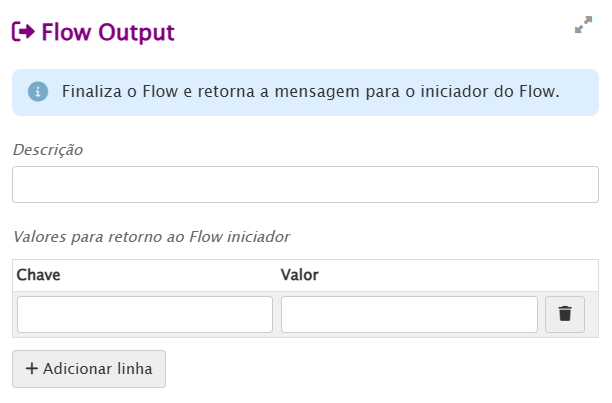
Finaliza a execução do fluxo externo e retorna a mensagem para o fluxo inicializador.
{% hint style="info" %}
O conector Flow Output faz parte de um conjunto de conectores para chamada de fluxos externos e retorno de dados do fluxo externo para o fluxo inicializador. Acesse a documentação dos conectores [Flow Call](https://docs.floui.io/guia/conectores/categorias/filas-e-eventos/flow-call.md) e [Flow Trigger](https://docs.floui.io/guia/conectores/categorias/triggers/flow-trigger.md) para saber mais sobre como utilizá-los em seu ambiente.
{% endhint %}
{% tabs %}
{% tab title="Parâmetros" %}
Parâmetros de configuração
| Descrição | Campo de texto | Descrição visual do conector no editor de fluxo |
| -------------------------------------- | -------------------- | --------------------------------------------------------------------------------------------------------------------------------------------------------------------------- |
| Valores para retorno ao Flow iniciador | Tabela de parâmetros |
Dados que serão enviados ao fluxo inicializador, no formato de objeto JSON.
Use a notação Mustache {{msg}} para enviar valores dinâmicos da execução do fluxo.
|
| Chave | Campo de texto | Nome da chave que será enviada para o fluxo inicializador |
| Valor | Campo de texto | Conteúdo da chave que será enviada para o fluxo inicializador |
| {% endtab %} | | |
{% tab title="Payload" %}
## Sucesso
Ao ser executado, o conector Flow Output irá encerrar o fluxo externo e poderá retornar dados de volta para o fluxo inicializador. Estes dados estarão localizados no Output Path configurado no conector Flow Call do fluxo inicializador.
No exemplo abaixo, no conector Flow Call foi enviado somente os campos name e last\_name do objeto user. O fluxo externo recebe estes dados, manipula-os e retorna novos dados para o fluxo inicializador para uso por meio do conector Flow Output.
Importante: O conector Flow Call aguarda a execução do fluxo externo até que ele finalize. Enquanto o fluxo externo estiver em execução, o fluxo inicializador também estará em execução.
Dados retornados para o fluxo principal
{% endtab %}
{% endtabs %}
---
# Agent Instructions
This documentation is published with GitBook. GitBook is the documentation platform designed so that both humans and AI agents can read, navigate, and reason over technical content effectively. Learn more at gitbook.com.
## Querying This Documentation
If you need additional information that is not directly available in this page, you can query the documentation by asking a question.
Perform an HTTP GET request on the following URL with the `ask` and `goal` query parameters:
```
GET https://docs.floui.io/guia/conectores/categorias/filas-e-eventos/flow-output.md?ask=&goal=
```
`ask` is the immediate question: it should be specific, self-contained, and written in natural language.
`goal` is what the user is ultimately trying to achieve, the reason they need the answer. Sharing it helps GitBook give you a better, more relevant answer. A goal is most helpful when it describes the outcome the user wants rather than restating the question. For example, with `ask=how do I create an API token`, a goal like `automate deployments from our CI pipeline` lets GitBook tailor the answer to that use case.
The response will contain a direct answer to the question and relevant excerpts and sources from the documentation.
Use this mechanism when the answer is not explicitly present in the current page, you need clarification or additional context, or you want to retrieve related documentation sections.